From Tool Chaos to Integrated AI Systems
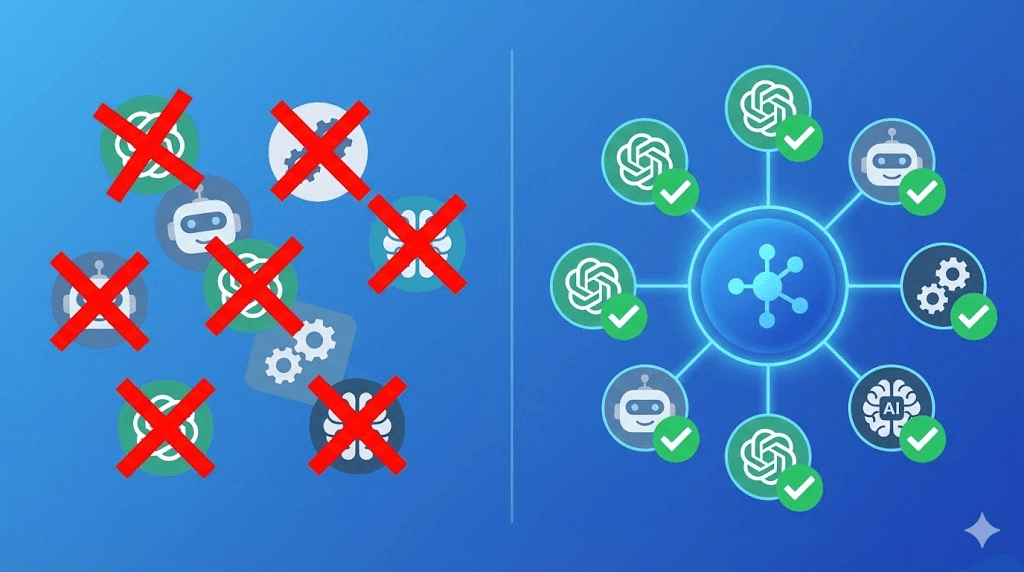
Why simply adding more AI tools breaks your business—and how to build a unified system instead.
I recently sat down with a marketing director at a fast-growing 50-person company. She was eager to show me her team's new, cutting-edge "AI stack."
She pulled up her screen and proudly listed them off: ChatGPT for brainstorming content ideas. Jasper for writing the actual copy. Midjourney for creating blog images. Make.com to tie some social media posts together. Notion AI for team documentation. Zapier running in the background trying to connect the rest.
That is six different tools. All of them are powered by AI. All of them are excellent at solving one specific, "local" problem. But when you look at how the team actually works together every day? It was complete chaos.
"We have all these amazing AI tools," she told me, rubbing her temples, "but somehow getting the actual work done feels harder than before. Everyone on the team is using a different system, and absolutely nothing talks to each other."
This exact scenario is what we call Tool Chaos—it happens when you have plenty of artificial intelligence, but actual business execution breaks down.
The Hidden Problem Inside Modern AI Stacks
How does this happen? Most AI tool stacks are built by accident. They are assembled reactively. A new problem pops up (like needing faster graphics), so a manager buys a new tool (like an image generator) to fix it.
When this happens, no one steps back to think about the "big picture" or system-level design. No one asks the crucial question: "How will these tools actually talk to one another?" No one considers how exhausting it is for employees to constantly switch between five different tabs, or how much data gets lost in the gaps between those apps.
The end result is something called "AI tool sprawl." It is a messy collection of really shiny, powerful features that do not combine into a smooth workflow. Every single tool might solve a narrow problem perfectly. But the gaps between the tools? Those gaps create brand new problems that are often much worse and more time-consuming than the issues you were trying to solve in the first place.
The Three Types of Tool Chaos
If you are feeling overwhelmed by your tech stack, you are likely experiencing one (or all) of these three types of Tool Chaos:
1Data Fragmentation (The "Where does this live?" Problem)
Think about where your business information sits right now. Your customer data lives locked inside your CRM (like Salesforce or HubSpot). Your internal guides live in Notion. Your website traffic stats live in Google Analytics.
Your new AI tools need to see all of this data to make smart decisions, but they can't access it. They are walled off. To fix this, your team ends up manually copying and pasting information between systems. This creates duplicate files, confusing inconsistencies, and expensive human errors.
2Context Loss (The "Starting from Scratch" Problem)
AI tools are only as smart as the context you give them. But every time you switch from one app to another, all that valuable context is instantly lost.
Let's say you are drafting a highly personalized email in ChatGPT. ChatGPT doesn't know about that customer's past support tickets sitting in Zendesk. Or maybe your designer generates a graphic in Midjourney, but the AI doesn't know your specific brand colors stored in Figma.
3Workflow Fragmentation (The "Tab Fatigue" Problem)
A typical, everyday marketing workflow might force an employee to touch 4 or 5 different AI tools. They draft the blog post in ChatGPT. They paste it into Grammarly to edit. They jump to Midjourney to make a banner image. They open Buffer to schedule it. Finally, they log into a totally different dashboard to track how it performed.
The mental strain (cognitive overhead) of this is massive.
The Path to Integrated AI Systems
The solution to this headache is not to go out and buy a "better" tool. The solution is to build integrated, unified systems.
Instead of hoarding a collection of disconnected AI apps, you need to design complete AI workflows. Instead of buying quick-fix "point solutions," you need connected systems that talk to each other seamlessly. You need to trade tool chaos for system coherence.
"A truly great AI system might use five different models under the hood, but to your employee, it looks like one simple, magical button."
Your team shouldn't have to think about the tools. They should only think about the final outcome. The system's job is to handle all the complicated stuff in the middle.
It is time to stop collecting tools. It is time to start architecting results.